

If you’re considering printing brochures or high quality postcards that have colour touching the edges of the finished piece then your printer will need a file that has bleeds and crops. Most layout programs today will automatically produce crop marks and allow you to specify your bleed distance.
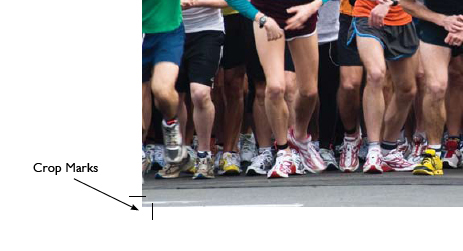
What are crop marks?
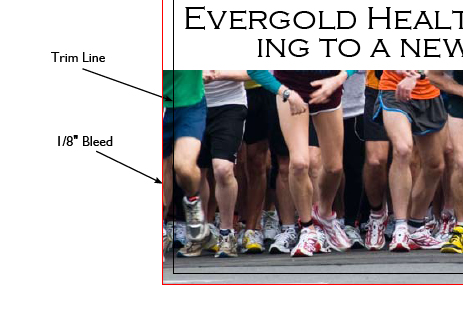
The term ‘bleeds’ is used for all images or items that touch the edge of the finished printed piece. The industry standard is a 1/8″ bleed. If you’re printing a piece that is 4″ x 6″ that has bleeds you’ll need to supply your printer with a file that is 4.25″ x 6.25″. Printers require this extra space to allow for movement during the printing and trimming process to ensure there isn’t white space showing after trimming. I’ve shown a postcard below that has bleeds on three sides. The black line represents the final trim and the red line is the 1/8″ bleed.
What are bleeds?
The term ‘bleeds’ is used for all images or items that touch the edge of the finished printed piece. The industry standard is a 1/8″ bleed. If you’re printing a piece that is 4″ x 6″ that has bleeds you’ll need to supply your printer with a file that is 4.25″ x 6.25″. Printers require this extra space to allow for movement during the printing and trimming process to ensure there isn’t white space showing after trimming. I’ve shown a postcard below that has bleeds on three sides. The black line represents the final trim and the red line is the 1/8″ bleed.
To summarize this in pictures……In order to receive a finished product that looks like this.

You will need to give your printer a file with crop marks and bleeds that looks like this.

If you need assistance setting up your files for printing please contact us.
Related Products



Leave a Comment