
One of the common issues that we encounter when producing vinyl banners or trade show graphics is low resolution or poor quality images. People will often take an image that is 3" x 5" and increase it to 3' x 5' and wonder why it looks really bad!!
If you have a good quality 300 dpi image that you need to make much larger here's a Photoshop workaround that will achieve excellent results.
Please Note: Unfortunately this process will not make a poor quality image better!! It has to be a crisp, clean image to start with.
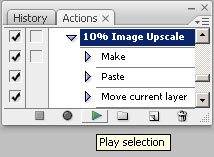
1. Open the image you need to enlarge. We'll be increasing this image in size 10% at a time so we're going to create an action to simplify this. You'll also be able to use this Action in the future for any other images you need to enlarge.
2. Open the Actions palette by clicking the Window dropdown and choosing Actions or you can press Alt+ F9.
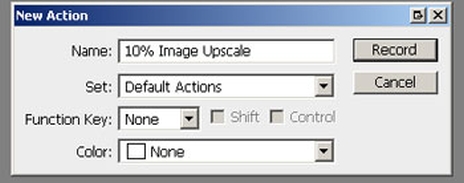
3. Click on the Create new action Button shown above. Call this new action 10% Image Upscale and all other settings should be as shown below.
4. Now we're going to Record a 10% increase in the image size. Press the record button on the Actions palette.
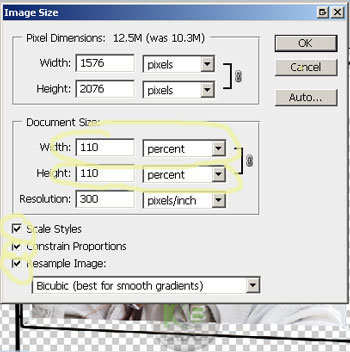
5. Click the Image dropdown menu and choose image size. Under Document Size change inches to percent for both width and height and set the width and height to 110 and click OK. Match the other settings shown below.

6. On the Actions palette press the Stop button.
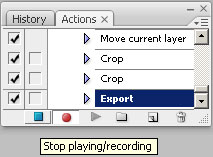
7. You have now created an action that will increase your image’s size by 10% each time you press the play button on your Action palette. Press the play button on your action palette until your image reaches the size you need for your vinyl banner or trade show display.
If you’re working with a 300 dpi image and you’ve got to enlarge it a lot, at some point the file size will become to large to manage. In large format printing (not offset printing) you can reduce your resolution to 120-150 dpi and still get a great finished product, this will also reduce your file size to a more manageable level. You now have an image that is suitable for using in a vinyl banner layout or in your trade show backdrops and custom displays.
Related Products





Leave a Comment